
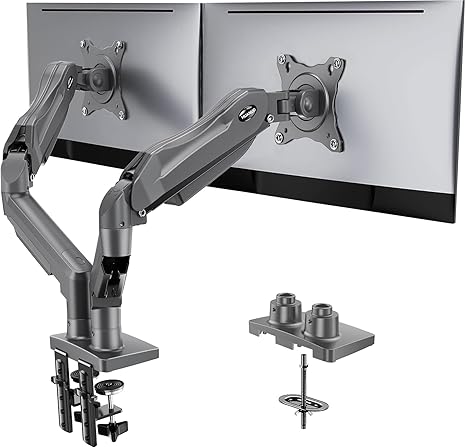
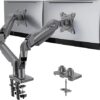
Soporte para dos monitores HUANUO, soporte de escritorio totalmente ajustable para pantallas de ordenador de 13 a 32 pulgadas, totalmente articulado, compatible con VESA 75×75/100×100, con abrazadera en C y base con ojal; cada brazo soporta de 2 a 9 kg – Gris
$54.99
- Compatible con pantallas panorámicas: para garantizar la compatibilidad con el soporte para dos monitores, cada uno de ellos debe cumplir tres condiciones a la vez: en primer lugar, el tamaño de la pantalla debe estar comprendido entre 13 y 32 pulgadas. Segundo, el peso de la pantalla debe estar entre 2 y 9 kg. Tercero, la parte trasera de la pantalla del monitor debe tener orificios de montaje VESA con una distancia de 75 x 75 mm o 100 x 100 mm.
- En cuanto a la compatibilidad con escritorios: su escritorio debe cumplir tres condiciones al mismo tiempo: En primer lugar, el material del escritorio: solo se recomiendan escritorios de madera; no se pueden utilizar escritorios de plástico o cristal. En segundo lugar, el grosor del escritorio debe estar comprendido entre 1,5 y 9 cm. En tercer lugar, la parte inferior del escritorio no debe tener vigas transversales ni paneles, ya que esto interferiría con la instalación. Recomendamos comprobar cuidadosamente que su escritorio y sus monitores cumplan todas las condiciones anteriores antes de realizar la compra.
- Sujeción con doble abrazadera en C: ¿Le preocupa que sus dos monitores puedan tambalearse o deslizarse? Nuestra base mejorada utiliza una plataforma más grande y una estructura de doble abrazadera en C para fijar firmemente el brazo para dos monitores a tu escritorio. Cada brazo mantiene tus pantallas estables de forma segura mientras escribes, haces clic y juegas: sin temblores, sin deslizamientos, solo una configuración limpia y segura en la que puedes confiar cada día. También ofrece la opción de instalación con montura de ojal; ambas opciones garantizan una fijación estable y segura para tu escritorio de 1,5 cm a 9 cm.
- Optimiza tu visión y disfruta de un amplio rango de movimiento: ¡ya no tendrás que molestarte en girar el ángulo ajustando el tornillo! El excelente diseño del brazo de escritorio permite ajustarlo con un movimiento muy suave. El soporte para monitor permite girar, inclinar y rotar tu monitor. Configura libremente tus monitores con el ángulo y la posición que prefieras.
- La comodidad es fundamental: nuestro brazo para dos monitores de escritorio eleva los monitores a la altura de los ojos, mejorando la postura, aliviando la tensión en el cuello y los hombros y aumentando los niveles de productividad. El diseño totalmente articulado y regulable en altura le permite trabajar en una posición ergonómica más cómoda.
Acerca de este artículo
Compatible con pantallas panorámicas: para garantizar la compatibilidad con el soporte para dos monitores, cada uno de ellos debe cumplir tres condiciones a la vez: en primer lugar, el tamaño de la pantalla debe estar comprendido entre 13 y 32 pulgadas. Segundo, el peso de la pantalla debe estar entre 2 y 9 kg. Tercero, la parte trasera de la pantalla del monitor debe tener orificios de montaje VESA con una distancia de 75 x 75 mm o 100 x 100 mm.
En cuanto a la compatibilidad con los escritorios: su escritorio debe cumplir tres condiciones al mismo tiempo: en primer lugar, el material del escritorio: solo se recomiendan los escritorios de madera; no se pueden utilizar escritorios de plástico o cristal. En segundo lugar, el grosor del escritorio debe estar comprendido entre 1,5 y 9 cm. En tercer lugar, la parte inferior del escritorio no debe tener vigas transversales ni paneles, ya que esto interferiría con la instalación. Le recomendamos que compruebe cuidadosamente que su escritorio y sus monitores cumplen todas las condiciones anteriores antes de realizar la compra.
Sujeción con doble abrazadera en C: ¿le preocupa que sus dos monitores puedan tambalearse o deslizarse? Nuestra base mejorada utiliza una plataforma más grande y una estructura de doble abrazadera en C para fijar firmemente el brazo para dos monitores a su escritorio. Cada brazo mantiene sus pantallas estables de forma segura mientras escribe, hace clic y juega: sin sacudidas, sin deslizamientos, solo una configuración limpia y segura en la que puede confiar cada día. También ofrece la opción de instalación con arandelas de montaje; ambas opciones garantizan una fijación estable y segura para su escritorio de 1,5 a 9 cm de grosor.
Optimice su visión y disfrute de un amplio rango de movimiento: ¡ya no tendrá que molestarse en girar el ángulo ajustando el tornillo! El excelente diseño del brazo de escritorio permite ajustarlo con un movimiento muy suave. El soporte para monitor permite girar, inclinar y rotar su monitor. Configure libremente sus monitores con el ángulo y la posición que desee.
La comodidad es fundamental: nuestro brazo para dos monitores de escritorio eleva los monitores a la altura de los ojos, mejorando la postura, aliviando la tensión en el cuello y los hombros y aumentando los niveles de productividad. El diseño de movimiento completo y altura ajustable te permite trabajar en una posición ergonómica más cómoda.
› Ver más detalles del producto
Información adicional
| Color | Black, White, Grey |
|---|---|
| Size | 13-32 Inch |


por Amazon Customer
I bought it in 2021 and I want to give a review after a year of using.
I have read people issue and one thing I feel like they misunderstand the product is the arms keep falling down because of weight of monitor. I use two 27” MSI curve monitors and have no issue with it. I tighten the joint that closest to monitor using allen key provided (there are screw adjustment of tightness) and also every pivot point has screw adjustment and you can use allen key provided to tight it.
I have not tried 32” monitor but I think this mount can handle the weight, maybe just one monitor as both 2 arms may not stretch out for the width of two 32” monitors.
So, I recommend this product for two 27” monitors or smaller, if you need two monitors on this mount.
por Le bogoss de la mort qui tue
Heel ye’ pretty darn’ nice this stand! Works just as it should eh!’
por Pedro Daniel Uribe Martinez
Los use para montar dos monitores y dos bocinas en mi escritorio con altura ajustable. Soporto mis dos bocinas de estudio de 5 pulgadas adams, un monitor dell de 24″ y un alienware oled de 34″. El ajuste de la cabeza hay que apretarlo mucho para que soporte los 8 kilos de las bocinas con mensulas pero quedo muy bien el resultado final. Traen sus rieles para acomodar cables, algo rigidos pero se aprecia que si sostienen los cables. Incluye muchos accesorios y formas de montarlos en tu escritorio.. Recomendados por el precio, ojo que hay unos en amazon iguales al doble de precio. Compren estos, son los mismos.
por Samantha
⭐️⭐️⭐️⭐️☆ Great Value Dual‑Monitor Ergonomics with a Couple of Caveats
✔️ Highlights
• Smooth, Flexible Motion
The gas‑spring arms offer effortless adjustability—tilt (about ±90° pivot, ~35° forward/back), swivel (~180°), rotation (360°), and height changes feel seamless and ergonomic . You can switch between landscape and portrait modes easily.
• Solid Build for Its Price
Made from aluminum/alloy steel, it comfortably holds two 13–32″ monitors (each up to ~19–22 lbs). Many users report no wobble even when fully extended  .
• Versatile Mounting Options
You can use either the C‑clamp (compatible with desks up to ~3.5″ thick) or the grommet mount (~1.6″ max)—excellent flexibility depending on your desk style  .
• Tidy Desk with Cable Management
Integrated cable clips help route wires along the arms for a cleaner setup—though thicker cables can be a struggle  .
• Ergonomic Benefits
Elevating your screens helps reduce neck and shoulder strain. Most users say their posture and productivity improved significantly .
⚠️ Things to Consider
• Setup Can Be Finicky
Many users describe the instructions as confusing or poorly translated, making prep work slow. Following a video tutorial is helpful. Tightening all joints thoroughly is essential to avoid wobbling ().
• Some Wobble with Heavy / Extended Setup
When using 32″ or heavier monitors, or screens pushed far outward, users report mild swaying or sagging. This seems to be tied to tension settings and extension length .
• Cable Clips Are Tight
The covers that snap onto the arms are small and tricky to install, especially with thicker cables. You may need longer Allen keys or some patience  .
• Needs Desk Clearance Behind
Due to its vertical arm structure, the mount requires about 9–10″ clearance from the wall to let you reposition monitors comfortably—especially on desks pushed against a wall .
💬 What Real Users Say
“The cable routing/management on it isn’t great … it isn’t as rock solid as I would like and there’s a little wiggle at times. That said, to get something better, you’d be spending 10x as much.”
— Reddit user on a large‑screen setup  
“The monitors move and rotate easily despite their weight. Assembly was trivial and all the tools I needed came in the package.”
— Valid user review praising smooth use after setup 
📋 Pros & Cons
✅ Pros ⚠️ Cons
Smooth gas‑spring movement & ergonomic range Setup instructions can be unclear; assembly takes time
Affordable yet strong—holds up to 32″ or ~20 lb per arm May wobble under heavy load or extended arms
Dual mounting options (clamp or grommet) Cable management bits are small and fiddly
Cleaner desk footprint, better posture Requires significant space behind desk for movement
🧠 Final Verdict
The HUANUO Dual Monitor Stand offers stellar ergonomics and adjustability at a budget-friendly price. If you’re setting up two moderately sized monitors (13–27″) and crave flexibility, it’s a top contender. Just ensure your desk meets the thickness requirements, allow clearance behind it, and be ready to snugly tighten all joints during setup. For the price, you really can’t ask for much more—especially once it’s dialed in.
por Mohammed El-Dakamawy
Great product and price!
por Miguel Mateo
This dual monitor stand worked really well for my setup and was fairly easy to assemble. The instructions were clear enough that the whole installation only took a short time, and all the necessary mounting hardware was included.
The build feels solid and stable, even with two monitors attached, and the gas-spring arms move smoothly without sagging. It is simple to adjust height, tilt, and rotation, so getting both screens aligned at a comfortable viewing angle is quick.
The stand also helps keep the desk tidy, thanks to the built-in cable management and the way it frees up space under the monitors. Overall, it is a great value if you want a sturdy, flexible dual-monitor arm that is easy to put together and adjust.
por Amazon Customer
Very sturdy and easy to assemble, the clamp it comes with isn’t going anywhere. Cord management works well. Very adjustable (I have one monitor vertical). Like most monitor stands I do wish it went a bit taller. I have an adjustable desk but for good body mechanics the distance from desk to monitor could be a bit higher for taller people at max height.
por Bailey Kinder
great option for mounting dual monitors as one piece (with full adjustability and functionality) without mounting to the wall. the clamp to attach it to the desk was fairly easy to assemble and worked with my samsung curved monitors! it is very versatile and adjustable to multiple heights and angles and they are tiltable. they are also adjusted individually so they don’t have to both be in the same position. it is a good weight where it is hefty enough to fully support the monitors without being too heavy or putting too much weight on the desk. I have a fairly thin, affordable standing desk that fully supports the clamp without issues (at least so far). I feel like the price is a little higher than necessary but the adjustability and ergonomic options this mount provides makes it worth it for me since I use it everyday. also, love that it comes with cord management!! makes it very streamlined.
por Emily C.
Sure, I could’ve went with the stands that came with the monitors, but these are so easy to install, adjust, and move around as needed! Up, up, down, down, left, right, left, right, B,A, Start. It adds that little extra room needed to my workstation, and the options are endless! I may just have to become a gamer. 007 373 5963
por Aaron T.
This dual monitor mount works as advertised and when it says two 34 inch monitors it means 16:9 sized. I knew that when I bought it and even still it holds both my 21:9 ratio monitors great. One is a 34 inch Sceptre C34 and the other is a 27 inch discontinued LGb ultrawide. I have to rotate the LG into portrait orientation for them both to fit and I’ll admit things are a little tight but I am still able to move the monitors for better viewing somewhat.
These monitor mount arms are solid and of high quality materials. I recommend following the instructions and not making adjustments until the monitors are installed as they can whip upwards under the tension they have if you don’t have the counterweight of the monitor. The adjustments that can be made to how hard or easy it is to move each part of the arm are a great feature. Except where the arms attach at the base where I haven’t found any adjustment screw to be tightened. These arms don’t move for me unless I move them but I wouldn’t use them for mounting in a trailer or other mobile scenario as the resistance isn’t very great.
The whole thing did take me about 45 minutes to put together. This is mostly because I had to pull the monitors off the desk, remove the base stands and then wanted to run the cables through the cable guides on the arms. The guide on the upper arm uses only one screw and clips in on one side. It honestly feels a little flimsy but ultimately holds both the thick three prong PC power cable and the DisplayPort cable without bulging or warping.
All in all this is a great option if you’re looking to free up some desk space from the monitor stands or you need/want to be able to adjust your monitor orientation.
por Steve Bowler
These are some of the best monitor stands out there I’ve used. The floating arms won’t quite be as flexible as you’d like, but they’re WAY easier to use than the standard straight pole, straight arm stands. You can even rotate your monitors straight up while plugged in to check which ports you’re using if they’re on the bottom of the monitor. They hold the weight of two 27″ monitors flawlessly, I’ve had older and heavier 4k monitors on these arms and they still supported them easily. Super easy to install, it just pinch/vice grips your desk with a really sturdy base, just buy these already.